Skip to content
iADam

Process automation

Stop retyping. Let your systems pass the work on.

Most of the work in a small business is not the craft itself but passing it along. An email that has to go into the system, an invoice that has to go into the books, a quote waiting for a signature. We connect your software so that happens on its own, with AI where something has to be read and understood.

Illustrative video, made with AI

Before and after

What changes on an ordinary Tuesday.

Without automation

  • An enquiry arrives and waits until someone opens the email
  • Data is retyped from email to CRM to accounting
  • Writing a quote means copying an old document and editing it
  • You call to check whether the client has signed or paid
  • You only notice mistakes when the client calls about them

With a workflow

  • The enquiry is in your CRM within a minute, with what the client wants
  • Data is entered once and flows to the other systems by itself
  • The quote is ready from your own prices; you check and send
  • After signing, invoice, planning and confirmation follow automatically
  • When in doubt a colleague is notified, and every step can be traced

Your team keeps making the decisions. The workflow takes over the passing on, retyping and chasing.

Flows at work

Workflows we have built.

These are not brochure examples. We built these flows for clients in construction, modular housing and campaigns, and for our own business. With their status as it is today.

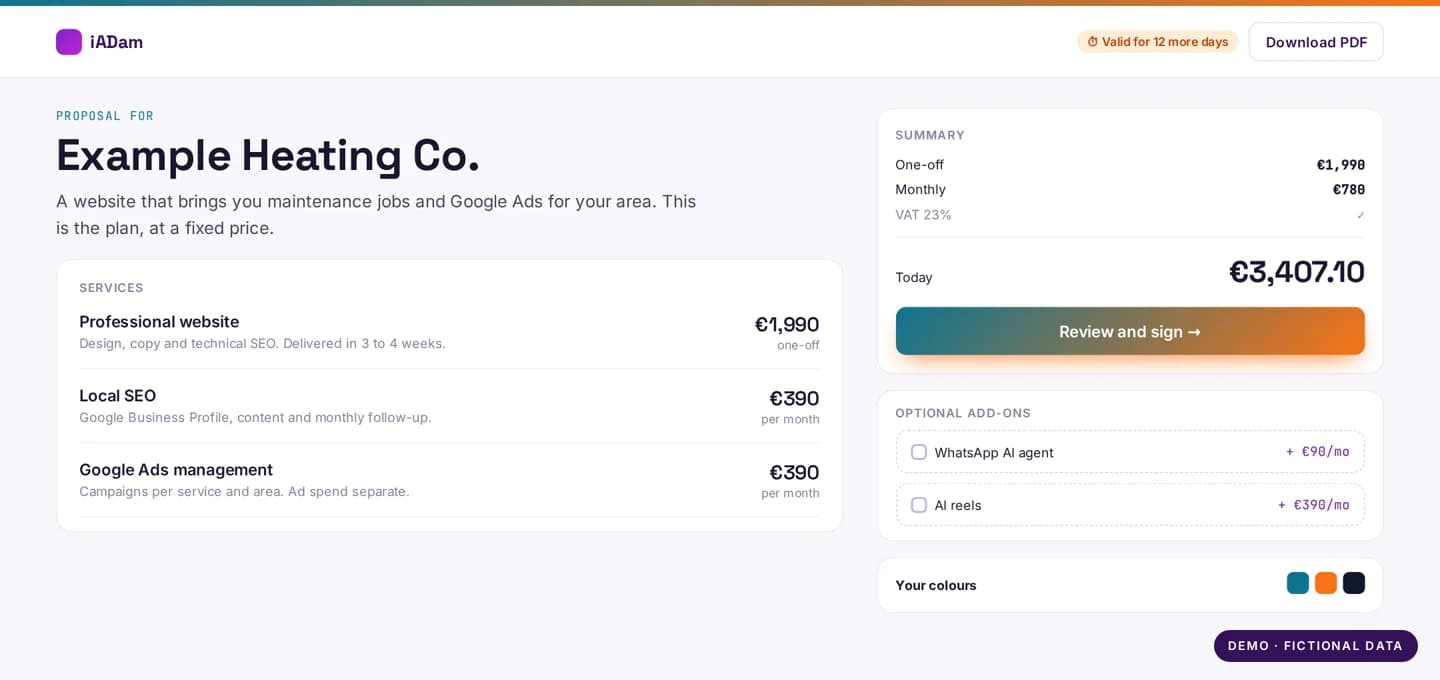
Online proposal in app.iadam.nl with services, prices and a sign button
Screenshot from app.iadam.nl, demo with sample data

Liveapp.iadam.nl

From enquiry to signed proposal

  1. 1An enquiry comes in through the website
  2. 2A proposal is ready with services and prices from the catalogue
  3. 3The client signs online and pays by SEPA direct debit
  4. 4The project appears in the client portal

Result: No PDFs back and forth, and no calls to check whether someone has signed.

See the project
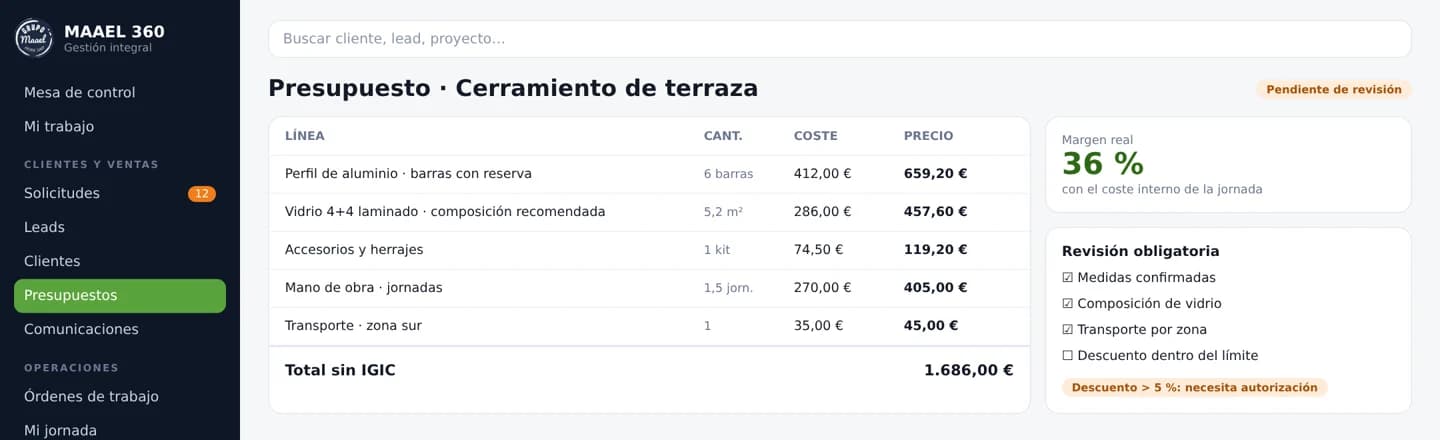
Demo of the MAAEL 360 quoting tool with lines, costs and margin
Demo with fictional data

In developmentGrupo MAAEL, windows and installation

Quotes with the company's own pricing rules

  1. 1Measurements and type of work come from the technical visit
  2. 2Materials, margin per material type, working days and transport per region are calculated
  3. 3Mandatory checks stay open until someone ticks them off
  4. 4The client gets a private link and signs on their phone

Result: The same rules for every quote, and the real margin of a job is right there.

See the project
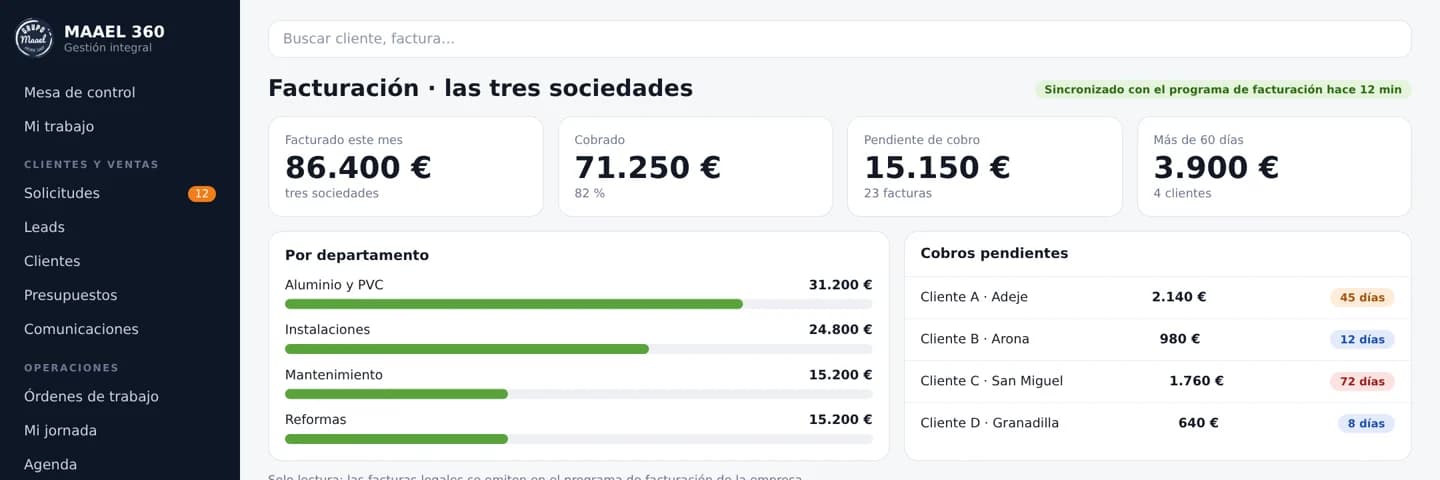
Demo of the invoicing overview for three companies in MAAEL 360
Demo with fictional data

In developmentGrupo MAAEL

Invoicing for three companies in one overview

  1. 1Every hour, invoices, lines and payments are read from Delsol
  2. 2Per client you see what is invoiced, paid and still open
  3. 3Open amounts are shown by age, with the PDF attached
  4. 4Official invoices stay in Delsol; the overview does not create any

Result: Nobody has to open three programs to know who still has to pay.

See the project
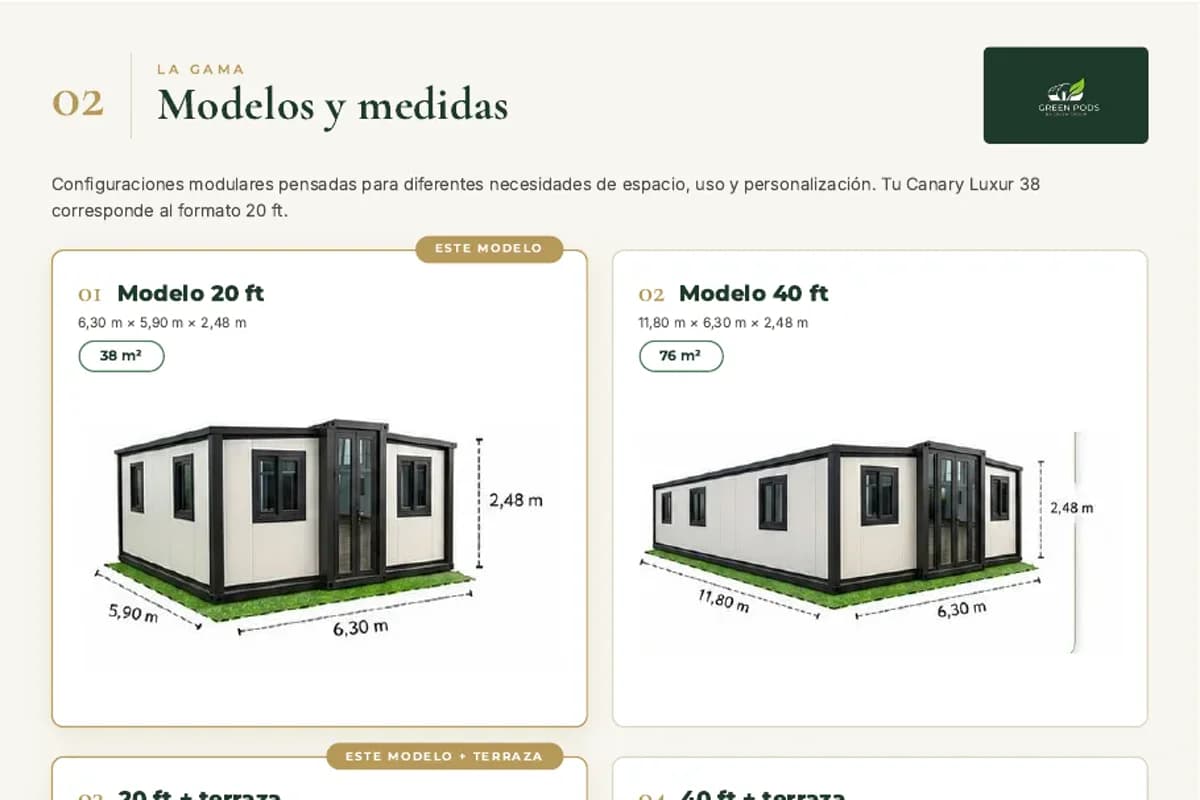
Page from a Green Pods technical catalogue with models and sizes
Page from a real catalogue

LiveGreen Pods, modular homes

Technical catalogues that build themselves

  1. 1Product data lives in one place: sizes, variants, technical details
  2. 2A technical PDF catalogue is generated for each model
  3. 3When a size or variant changes, the catalogue follows

Result: Nobody retypes product data, and the catalogue always matches the website.

See the project
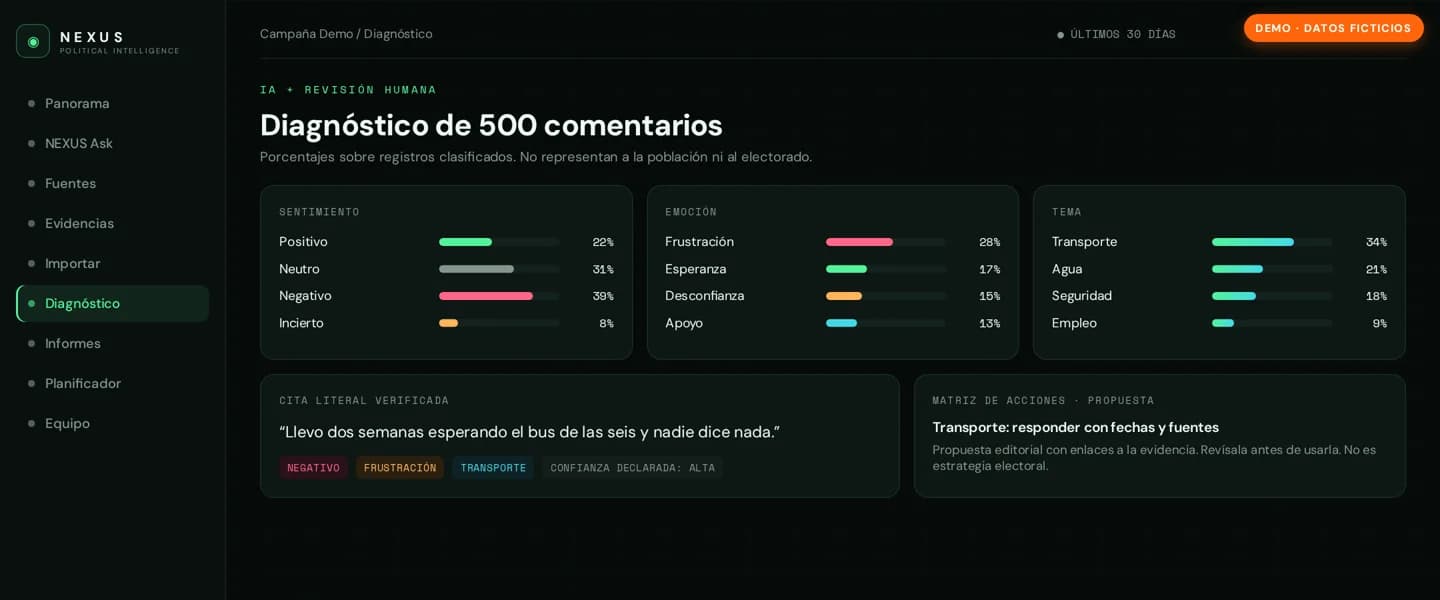
Demo of the AI comment diagnosis in Radar NEXUS
Demo with fictional data

LiveRadar NEXUS

From a thousand comments to one report

  1. 1Comments are imported, including via a Chrome extension
  2. 2AI classifies up to 1,000 comments at a time by sentiment, emotion and theme
  3. 3A person reviews the outcome
  4. 4A report and a planner are ready for the team

Result: The team reads the conclusions instead of every comment.

See the project

For your business

What you can automate.

Examples by department. If you recognise two or three, we usually already know where to start.

Sales

  • Enquiries from site, email and WhatsApp in one CRM
  • Preparing quotes from your own prices
  • Following up when a client does not reply

Administration

  • Purchase invoices and receipts into the accounts
  • Sales invoices after a signed proposal
  • Payment reminders at the right moment

Operations

  • Work orders and planning from an order
  • Informing suppliers and technicians automatically
  • Updating stock after a sale

Customer service

  • Sorting email by topic and urgency
  • Preparing a draft reply
  • Complaints as a prioritised ticket

Management

  • A weekly overview without Excel work
  • Alerts when something gets stuck
  • Figures from different systems in one place

Integrations

We work with the software you already have.

No new package, no migration. If a system has an integration or API, we connect to it. If it is closed, we find a route through export or email.

  • Outlook
  • Gmail
  • Google Workspace
  • Microsoft 365
  • Exact Online
  • Moneybird
  • Teamleader
  • HubSpot
  • Pipedrive
  • Odoo
  • WhatsApp Business
  • Google Agenda
  • Notion
  • Airtable
  • Slack
  • Shopify
  • WooCommerce
  • Excel

How we work

From conversation to first workflow.

  1. 1

    Free call

    In 30 minutes we go through the work that comes back every week. We tell you honestly what is worth it.

  2. 2

    Map and fixed price

    We map the process and choose the flow with the most impact. You get a fixed price.

  3. 3

    Build and test

    We build on your own systems and test with real examples. Usually live in one to two weeks.

  4. 4

    Measure and expand

    Logging shows what happens. Then we choose the next step together.

How many hours are in your manual work?

Enter how many hours your team spends each week on retyping, chasing and searching. You see straight away what that time costs per year.

€12,420per year on manual work

Based on 46 working weeks. Not everything can be automated; in the call we look at which part can.

Honest advice

When automation pays off, and when it does not.

It pays off when

  • the work comes back the same way every week
  • there are clear rules for when something is right
  • mistakes or delays cost money or clients
  • the systems have an integration or export

Better not when

  • the process still changes every month
  • it is something done a few times a year
  • nobody owns the process
  • the real problem is messy records

Investment

What it costs depends on your process.

Start small
One taskFor example invoices from your inbox into the accounts, or an alert when an enquiry gets stuck. That does not need a big budget.
A whole process
End to endSeveral steps that connect, for example from enquiry to quote and invoice.
Step by step
At your paceStart with what pays off most and expand when it works. You do not have to do everything at once.

After a free 30-minute call you get a fixed price, with no surprises afterwards. If it does not fit your budget, we tell you honestly what can.

Frequently asked questions

Questions about process automation.

Which processes should you automate first?

Work that comes back often, follows fixed rules and where mistakes cost money. In small businesses that is almost always: handling enquiries, writing quotes, creating and chasing invoices, and retyping data between two systems.

Do you only work with n8n?

No. For connecting existing packages we often use n8n, because it runs in the EU, you do not pay per user and the workflows stay yours. If you have your own software or a custom platform, we build the automation directly in that environment. If you already use Zapier, Make or Power Automate, we build on that.

Do we need to replace our current software?

No. We connect to what you already have, such as Exact, Moneybird, Teamleader, HubSpot, Outlook and Google Workspace.

What happens if a workflow makes a mistake?

Every workflow has a fallback: when in doubt it goes to a person instead of carrying on. Every step is logged. For processes with financial impact we build in an approval step by default.

How fast is the first workflow live?

Usually within one to two weeks, depending on the number of integrations and how quickly we get access to the systems.

Do we need technical knowledge in-house?

No. We build, document and maintain. If you want to make changes yourself later, we teach someone on your team how to work with it.

How is this different from an AI agent?

A workflow follows fixed steps. An AI agent reads and understands text and decides, within limits, what the next step is. We often combine them: the agent reads the email, the workflow puts it into your systems.

In the region

From Winschoten, for the whole north.

Our office is at Nassaustraat 18 in Winschoten. We work for businesses in Groningen, Drenthe and Friesland. We meet at the office, at your business or online.

What are you still retyping?

Tell us which process comes back every week. In a free 30-minute call we look at where your first workflow pays off most.

No spam, no follow-up chains. Personal reply from a real human.

WhatsApp
Business process automation with AI | Custom workflows · iADam